
Install Lumi B2B WholesaleHub
Install Lumi B2B WholesaleHub and enable its app embed in your Shopify theme.
1. Install Lumi B2B WholesaleHub
Open the Lumi B2B WholesaleHub installation page and select Install. Sign in to Shopify if prompted, choose the store you want to use, and review the requested permissions before confirming installation.
Once installed, open Lumi from Apps in your Shopify admin. If you already have Lumi installed, continue with the steps below to enable it in your theme.
2. Open your theme editor
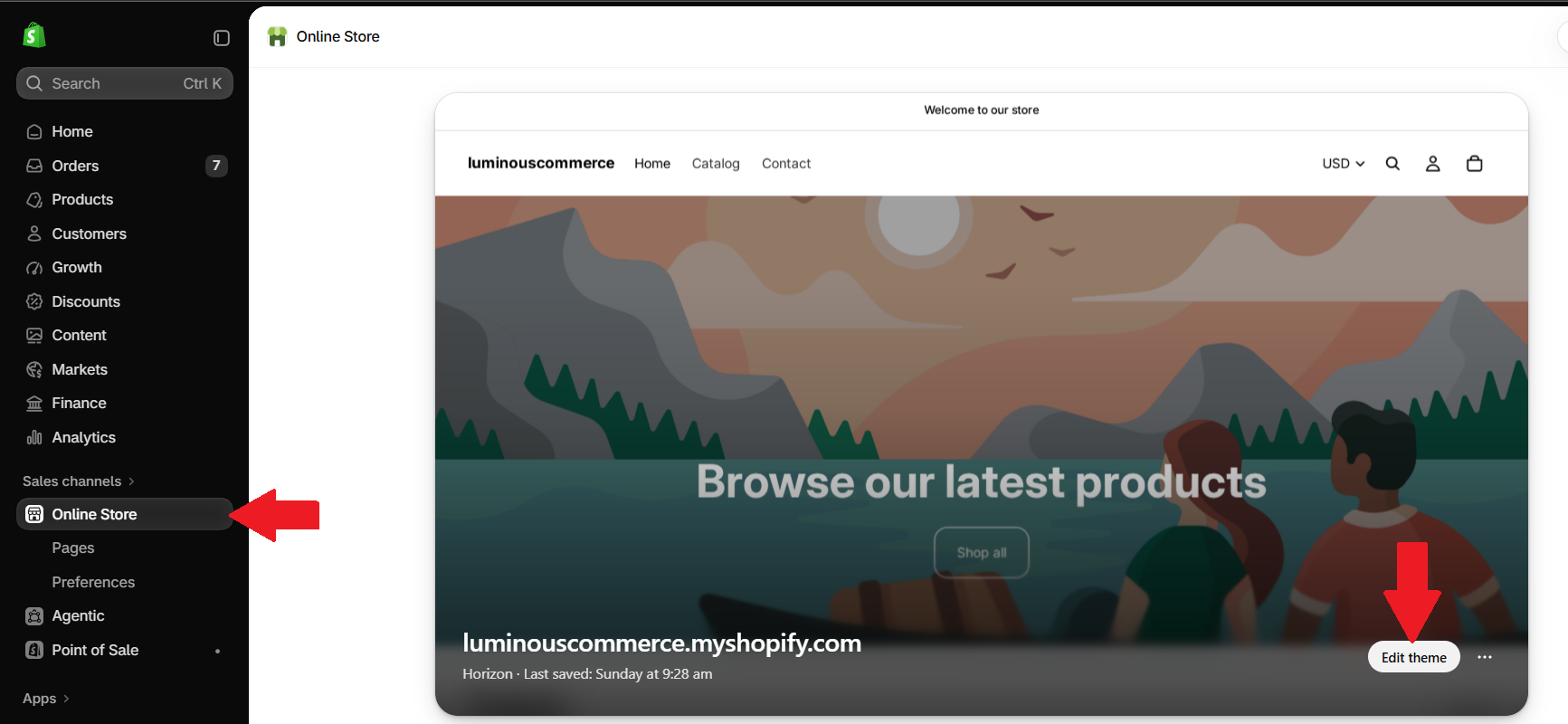
In Shopify admin, select Online Store, then click Edit theme on the theme you want to use with Lumi.
Choose your current theme to enable Lumi on your live storefront. The example uses the Horizon theme.
3. Open App embeds
In the theme editor, select App embeds from the toolbar. This opens the list of app embeds available for your theme.

4. Enable Lumi and save
Find Lumi WholesaleHub in the App embeds panel. You can use Search app embeds to locate it.
- Turn on the toggle beside Lumi WholesaleHub.
- Click Save in the top-right corner of the theme editor.

The app embed is now enabled for this theme. If you switch to another theme, enable Lumi in that theme as well.
Return to Lumi to set up your first feature:
- Custom Pricing: offer wholesale prices to eligible customers.
- Volume Discount: create quantity or spend discount tiers.
- Price List: set individual product or variant prices.
- Registration Form: collect wholesale customer applications.